Showing posts with label Teacher Resources. Show all posts

Sunday, April 20, 2025

Using Nearpod in Classrooms for Global Collaboration

In today's society, global collaboration is no longer optional, but necessary. Students are growing up in a globally connected society, and equipping them with tools to collaborate, and problem solve with others around the world is essential. One of the tools that help make this possible is virtual reality, and Nearpod stands out as an accessible way to bring immersive, international experiences into classrooms.

What is Nearpod?

Nearpod is an learning platform that allows educators to deliver engaging interactive lessons using assessments, multimedia content, and collaborative tools. Its virtual reality feature lets students take 360 degree virtual field trips to global landmarks, cultural heritage sites, and natural wonders of the world, all from the comfort of the classroom.
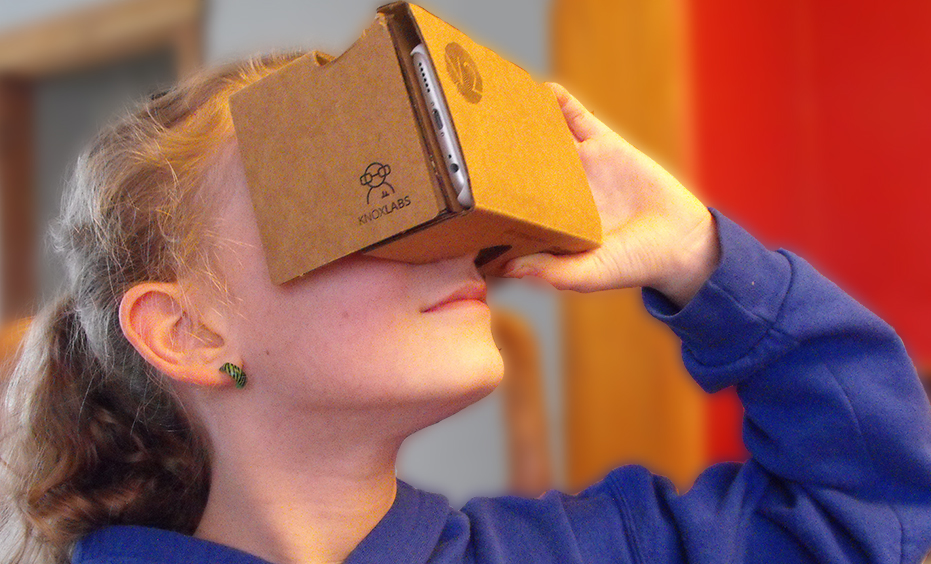
One of the benefits of Nearpod is that unlike other virtual reality tools it is not necessary to use expensive equipment. Nearpod is compatible with inexpensive viewers like Google Cardboard and can also be used on regular tablets and Chromebooks which makes it highly accessible for classrooms around the world regardless of budget constraints.

Supporting Global Collaboration

Nearpod goes beyond just sightseeing, it lays down the groundwork for meaningful cross cultural communication and project based collaboration. Students on opposite sides of the world can take a virtual tour of the same historic place together. After exploring, they can collaborate and ask questions that would be unique to their culture which can help build a greater global understanding. Students can also visit important environmental places that are in danger like the Amazon Rainforest or the melting glaciers in the arctic, then partner with peers in other countries to brainstorm climate action plans. This fosters empathy, critical thinking, and problem solving in the real world. Nearpod can also enable students to explore everyday life in other countries, visiting towns, homes, and schools in different regions. These experiences can become conversation starters in global writing programs or cultural exchanges. 

Nearpod Lesson Plans 

Educators can incorporate Nearpod into their classrooms through lesson plans such as this one. In this lesson students can explore the grand canyon and learn about it through a virtual tour and in an interactive environment. After the virtual tour students can make a poster sharing what they learned from the experience.

Nearpod can be used in many creative ways to help build a deeper understanding of global connections and can create a dialogue between different cultures through its use in the classroom.

Monday, April 14, 2025

WE Virtual Learning Classroom - The power of gratitude

WE Virtual Learning Center is a website that offers resources and programs to support teachers and empower young students to become their strongest selves. There are modules, courses, campaigns, lesson packages and supporting resources, as well as virtual workshops, and a video library. This website's goal is to help teachers stay organized and to lift up their students, while also focusing on students well-being and goals. 

As I was exploring the WE Virtual Learning Center, I came across the WE Teachers Courses which provides a multitude of resources for teachers depending on their focus. For example, there are two resources and courses on the science of power and gratitude, promoting that gratitude is a key ingredient for mental health and well-being. The website shares how teachers can implement gratitude into their personal lives, to be able to implement it into their classrooms. If this is a resource a teacher is interested in, there is a 31 page document to dive deeper into why gratitude is important, how it enhances verbal and written expression, along with a variety of ways to incorporate it in your life and classroom.

Each resource is also provided with a course that shares videos, questions, and quizzes to help you really understand the meaning and course content. I decided to take the course on Say it Now: Why Gratitude is a Key Ingredient for Well-being and Promoting SEL and was introduced to the Say it Now workshop video. After watching the video, they provide seven questions reflecting back on what was discussed.If a question is answered incorrectly, they provide learners the opportunity to try again. Once the question is answered correctly, the course explains why it is correct. After completing the course, you can continue to read the resource page and begin to implement this in your life and classroom!


Sunday, April 13, 2025

Changemakers: Service Learning Toolkit

Why This Toolkit is a Game Changer

The WE Schools Service Learning toolkit is a guided roadmap that assists in examining social issues, creating action plans, and implementing effective projects within the community. With a service learning emphasis, it aligns classroom education with practical application, providing real world experiences that coincide with classroom learning. Students are encouraged to ask hard questions, set targets, and work collaboratively.

Standout Features

Perhaps most striking, is how student friendly it is. The language is simple and compelling, there are interesting pictures, and the design allows for it to be easily followed by students as they make their way through the process from concept to impact. It is full of actual stories of success that make it still feel like something within reach.

The toolkit reflects a range of flexible campaign choices, including initiatives around sustainability, equity, and wellness, or the D.I.Y. campaign resource. The adaptable nature allows learners to link what they learn to those issues that are most meaningful to them. Moreover, the toolkit focuses strongly on reflection at all steps, with opportunities for students to record progress, to critically reflect upon experience, and to acknowledge and enjoy both academic and personal growth.

How I Plan to Use This Resource

In my future classroom, this toolkit will be great for project based learning. I will encourage my students to become active citizens through activities like a food drive at school, an awareness campaign on social media, or an environmental project for the community. We will use the worksheets to facilitate discussion, make decisions, and analyze results.

Sunday, April 6, 2025

Seven Helpful Accessibility Tools

Accessibility tools are total amazing for students who need a little extra support whether that’s with reading, writing, communicating, or just navigating technology. After exploring some helpful resources, I have found seven tools that really stand out compared to the others.

Read&Write

This is a powerful tool for supporting students with learning differences like dyslexia or ADHD. It works as a toolbar and offers features like text-to-speech, word prediction, and a dictionary. What makes it so effective is how it helps students engage with text in ways that suit their individual needs, so no matter who uses it there is something that can be gained.

Voice Typing

Voice Typing allows the words that you speak to be automatically written down on the page. It is perfect for students who have difficulty typing or expressing themselves through writing. Instead of worrying about spelling or punctuation, they can focus on getting their thoughts out onto the page. It’s also great for when students are doing brainstorming activities so time can be saved by avoiding the need for writing everything down manually.

Microsoft Immersive Reader

Microsoft Immersive Reader creates a space free of distractions for reading and lets students customize the experience. They can change the background color, adjust text size, break text into syllables, or even have it read aloud. This tool is especially helpful for students who struggle with paying attention when reading. 

Snap&Read

This might be one of the most versatile tools out there. It can read any text on a webpage aloud, translate it into different languages, simplify it, or even help create an outline of the content. It’s a lifesaver for students who are overwhelmed by heavy reading assignments or for those who benefit from simpler language and visual supports. 

ChromeVox

ChromeVox is great for students who are blind or visually impaired. It is a screen reader that reads everything on the screen aloud, making it easier to navigate documents, web pages, and assignments without relying on sight. It gives students the independence to use their device fully and participate in class just like everyone else. 

Beeline Reader

Beeline Reader changes the color of text across lines to guide the reader’s eyes more smoothly. This color gradient helps students stay focused and improves reading speed, especially for those with attention or tracking issues. 

Ava

Ava is a live captioning app that provides captions during conversations. This is especially helpful for students who are deaf or hard of hearing. Whether it’s an in person class discussion or an online lecture, Ava transcribes speech instantly so students can follow along and participate with the rest of the class. 

These tools all help education become more accessible. Everyone learns differently, and with the right support, every student can feel empowered to succeed.

Sunday, March 30, 2025

Exploring Google Maps by Using a HyperDoc


Traditional geography lessons can feel a bit dull, but HyperDocs bring them to life. I explored a HyperDoc for Google Maps in the form of a slide deck that makes learning both fun and more engaging than ever.

Instead of just reading about maps, students interact with them by zooming in, exploring Street View, and even traveling back in time. The lesson starts with a simple challenge of finding your school on Google Maps. From there, students zoom in, explore, and observe details they may not have noticed before.

One of the most unique parts of this is the inclusion of pegman, the little yellow figure that unlocks Street View. Dragging pegman onto the map lets students take a virtual walk around their neighborhood, seeing familiar places from a whole new perspective. This inclusion allows for a much more interactive experience for the students when using the map.

The HyperDoc also introduces Google Maps’ timeline tool, allowing students to view how places have changed over time. This sparks discussions about urban development, history, and environmental change through an interactive experience where students can work at their own pace.

What makes this HyperDoc so effective is its ability to turn students into active learners. Instead of passively memorizing facts, they explore and discover for themselves. Geography isn’t just something they read about in a textbook, it is something that they experience.


Sunday, March 23, 2025

The Smithsonian National Museum of Natural History Virtual Tour

 Today I took a virtual field trip at The Smithsonian National Museum of Natural History. A perfect summary of the virtual tour comes form the website itself saying, " The Smithsonian National Museum of Natural History virtual tours allow visitors to take self-guided, room-by-room tours of select exhibits and areas within the museum from their desktop or mobile device. Visitors can also access select collections and research areas at our satellite support and research stations as well as past exhibits no longer on display." On the site I clicked on "visit" it took me to a page where on the left side a three lined drop down menu was. I clicked on it and all the way at the bottom was a button label virtual tour. It brought me to a page with five different options of tours. The options were: Permanent Exhibits, Current Exhibits, Past Exhibits, Museums Support Center and Research Stations, Narrated Tours. 

Minerals 1 Exhibit 
The first thing I clicked on was Current Exhibits. Here I found what felt like one hundred hyper links to different exhibits within the museum. In an organized alphabetical list the different exhibits that fell under a subcategory. For example I clicked under Janet Annenberg Hooker Hall of Geology, Gems, and Minerals, on the hyperlink "Minerals 1" here it took me to the exhibit where there was case of minerals and it was almost like a video game. There were arrows were you could pick which was you wanted to go next and a 3rd map of the museum! It was actually really cool, it feels like you are at the exhibits. In addition, there is also access to narrated tours of exhibits like the, David H. Koch Hall of Fossils- Deep Time, Human Origins, Objects of Wonders, and Sant Ocean Hall exhibits and a few more! These videos walk you through the exhibits providing information on whatever is being showcased. All in all I really enjoyed the site and see it being useful in the classroom one day! There is so much to see and different learning that can be applied and supported in this virtual tour. 


Sunday, March 2, 2025

Bridging the Language Gap with Microsoft Translator

    In the diverse learning environments of today, effective communication between educators, students, and families is more important than ever. Many students come from multilingual backgrounds, and language barriers can create challenges in learning, engagement, and family involvement. As educators, we need to ensure that every student and their family feels heard, understood, and supported regardless of what language they speak.

Why Language Accessibility Matters

     With the multicultural nature of schools and with students and families speaking a wide range of languages, many schools are struggling. This struggle with providing translation services is due to a lack of resources with hiring language interpreters for each language being very costly. I have found that there is another way to help break the language barrier through the use of technology, in this case using Microsoft Translator.

How Microsoft Translator can Help

     Microsoft Translator is a powerful tool that allows educators, students, and families to communicate in multiple languages in real time. Whether through text translation, live captions, or speech to text conversations, this tool makes multilingual communication seamless. Using Microsoft Translator educators can effectively translate in real time during parent teacher meetings which ensures that every family has access to important information. Teachers can also use Translator to translate instructions and lessons to make sure that non English learners don't fall behind.

Using Microsoft Translator

The best part about Microsoft Translator is its ease of use. Teachers, students, and parents can access it through a mobile app or integrate it with platforms like OneNote and Word for written translations. It’s a simple yet powerful way to ensure that no one feels left out due to language differences. If you’re an educator looking for ways to improve communication in your school, Microsoft Translator is a tool worth exploring.


Friday, February 28, 2025

Communicating With Sway

Why is communication important?

Communication is a vital component of any classroom, as it fosters an environment where ideas, knowledge, and feedback can be shared effectively. Strong communication allows teachers to clearly

explain concepts and ensure students grasp the material being taught. It also encourages student engagement, as learners feel more comfortable asking questions, participating in discussions, and expressing their thoughts. When students communicate clearly, they can better understand concepts, ask for clarification, and express their ideas confidently. This encourages collaboration with peers, allowing them to share knowledge, solve problems together, and develop critical thinking skills. Furthermore, students who can communicate well are more likely to succeed in academic and social settings, as they are able to articulate their needs, listen actively, and contribute to group discussions. 


About Sway:

Knowing how beneficial communication is in a classroom full of students, it is important to find tools that can help grow positive communication. One incredible tool is Microsoft Sway. Sway is a versatile digital tool that allows users to create visually engaging presentations, reports, content, and actively engage with others. It fosters collaboration by allowing multiple users to work on a project at the same time, making it easier to share ideas and updates in that moment. Its integration with other Microsoft tools, such as OneDrive and Teams, enhances seamless collaboration, allowing team members to contribute and edit content from anywhere. Most importantly, Sway strengthens communication by providing a tool where users can express ideas clearly and creatively. The ability to add text, images, videos, and interactive elements makes it an effective tool for conveying information in an engaging and accessible way. There is an incredible video that will be linked here that shows how to use Sway and how to create a newsletters, presentations, and webpages!


How does Sway grow students' communication skills?

Microsoft Sway is excellent in helping students grow their communication skills by allowing them to create interactive, multimedia-rich presentations. With Sway, students can organize and express their ideas in a dynamic and visually appealing way, through incorporating text, images, videos, and even charts. This encourages them to present information creatively and more effectively, making it easier for both them and their peers to understand complex topics. This tool’s collaborative features enable students to work together, providing a platform for easy communication and teamwork. By using Sway, students can improve their ability to communicate ideas clearly, engage their audience, and collaborate with others, all while developing a deeper understanding of the subject matter. 


https://www.evolveedtech.com/evolveblog/b/six-ways-to-use-microsoftsway

Personal Note:

After discovering Sway through my course book Sail the 7Cs With Microsoft Education, I was immediately impressed and eager to start using it. With several upcoming projects in my classes, I'm excited to dive in and explore its incredible abilities. What’s even better is that learning and mastering collaboration and communication tools like Sway, will allow me to leverage them to enhance my future students' learning experiences!

Monday, February 24, 2025

Global Education with 'Global Kids'

In today’s world, global education is more important than ever. It goes beyond teaching students about geography or world history, but instead it’s about fostering a deeper understanding of diverse cultures, perspectives, and global issues. By incorporating global education into the classroom, we give students knowledge and skills they need to navigate an interconnected world. This type of education not only broadens their worldview but also encourages empathy, critical thinking, and collaboration. In this blog, I’ll explore how global education benefits students and share a classroom activity that highlights the power of community both locally and globally. 

          As I explored the various amounts of incredible global education tools we have access too, there was one for primary education that really stood out to me called Global Kids. Developed by global education expert Homa Tavangar and the creators of Barefoot Books’ bestselling Mindful Kids deck, Global Kids includes over 50 hands-on activities that are divided into 5 categories to teach children about food, festivals, games, crafts and ways of helping others around the world. 

        Each card features a front side that introduces the activity, offering an overview of its cultural significance and meaning within the specific location. On the reverse side, students will find step-by-step instructions guiding them through the process, empowering them to recreate the dish, craft, or game as it is practiced in the culture they are exploring. One example of a preview offered by the website is an activity where students learn about the Festival of Lights in India. For example, Diwali, which means "festival of lights," is a time when many people in India and beyond celebrate the power of good over evil. Students are then provided with instructions on how they too can create a lantern inspired by this vibrant and meaningful celebration.

        What is inspiring about these cards is that they serve as a solid foundation for lesson plans, offering educators a starting point for exploring diverse cultures with their students. Teachers can easily build upon the activity, expanding it into a week-long exploration filled with deeper discussions, projects, and hands-on learning. This allows educators to tailor the experience to their classroom’s needs and interests, creating an immersive cultural learning experience. In my future classroom, I am eager to incorporate this global education tool, as it will not only enhance traditional lesson plans but also broaden students perspectives, encouraging creativity and critical thinking through the lens of different cultures.


Sunday, February 23, 2025

The Global Educator Toolkit

The Tools of the Trade

    As an educator it is important to have a wide variety of tools at your disposal to be used for your classroom learning environment. Some of these tools may cover a wide range of needs while others are highly specialized for certain situations. Keeping these tools handy can help both yourself as an educator as well as the students in your classroom.

What Tool is Best?

    Out of all the tools in the Global Educator's Toolbox the one I found to be the most useful is Learning for Justice. I chose this tool because it aligns with my goal for my classroom to create a welcoming environment that is inclusive to all of my students. This tool offers research strategies to address issues such as racism, bias, and social justice. Each of these issues being addressed are critical to understand in today's educational environment. With this information educators can be equipped to help students develop the skills necessary for navigating a diverse world.

Image Source

What I Found Useful in this Tool

Image Source

    One of the most beneficial aspects of Learning for Justice is its wide variety of available lesson plans that are categorized by grade level and topic. These lessons provide content that can be adapted to suit different classroom settings. Learning for Justice also offers professional development resources that help teachers become more culturally educated educators by including action guides and toolkits to help with discussions on equity and justice. The student texts and perspectives portions featured highlight diverse voices and experiences, ensuring that students engage with materials that reflect a wide range of backgrounds. The site also includes unique content such as film kits and teaching strategies that encourage critical thinking and active engagement with social justice topics. All of these aspects combine to make a highly effective tool for an educator looking to improve the quality of their learning environment.

How I Would Use Learning for Justice in My Classroom

    There are several ways that I would use this resource to improve my classroom. Since so many lesson plans are provided by Learning for Justice I would look through each one and decide which ones to incorporate into the curriculum. Doing this would help include ideas such as diversity, identity, and equity into my classroom. In addition to the lesson plans provided I would also include some of the student texts on the website to help introduce more diverse voices into my classroom. The inclusion of all of these diverse and sometimes complicated ideas can help facilitate respectful discussions of these heavy topics in a safe environment.

Sunday, February 9, 2025

Collaboration in the Learning Environment

    Everyone has their own ideas and is unique which is why collaborating with each other is so important. Through collaboration, information can be easily spread and new ideas can be shared. Collaborating with other people is something that everyone will need to do at some point in their life and learning how to do it more efficiently is an important skill to learn. There are many programs that make collaboration easier and can be used to help students collaborate together or help teachers collaborate with each other.

Collaboration Between Students

     One of the ways that students can collaborate with each other is described in the collaborators chapter of Sail the 7 Seas with Microsoft Education. One of the collaboration methods between students in this section is through Minecraft. Since Minecraft is such a popular game it is likely that students will already know how to use it, and if not the controls are intuitive and easy to learn. By using Minecraft students can communicate with each other and work together on projects at the same time. Unlike other methods of collaboration, students are more likely to effectively use Minecraft since there is an element of fun behind it.

Collaboration Between Educators

    Collaboration is not just for students, educators can also benefit greatly. One of the best ways for educators to collaborate with each other is through social media. Through the use of specific hashtags and by following other educators it is possible to collaborate with people from all across the world. On social media educators can collaborate on lesson plans and different ways of teaching a wide variety of students.

Friday, February 7, 2025

Setting goals to Empower the Individual

There have been many positive changes within education that focus on the individual student, rather than the class as a whole. With these changes, educators have seen their students take learning into their own hands and push to achieve goals they feel can be reachable, while also giving them a challenge to go above their typical learning limits. In the book, Adventures in Authentic Learning by author Kristin Harrington, Harrington dedicates a passage on pages 4-6  to “Goal Setting for Empowerment.” As a future educator, this passage is crucial in establishing ways to encourage students to transform into leaders, rather than listeners or followers, and have a say in how/what they learn. This is developed through goals and Harrington gives great ways on how to implement them in the classroom.

Every student learns differently, what may be beneficial for some students may not be as favorable to others. When having students set goals, it is important to give options on how and where these goals can be accessed. Some students may prefer their goals to be written, others might rather see their goals through pictures or drawings, while another group of students do best hearing their goals out loud. There are so many incredible resources, whether it be through technology or what can be used within the classroom, students have the ability to decide what works best for them. Let’s get into some ways students can create their goals, that correlate with how they learn best:

A great way for students to see their goals is by creating vision boards, or also known as idea boards. Educators can encourage their students to find pictures and/or create drawings that show what their goals are. For example, if a student's goal is to do well on their science labs, they could draw beakers with A+s in them and have an arrow pointing to a happy face. Another way to lay out this goal could be to find a picture of a scientist or other students working on an experiment. This can help students visualize the goal they want to achieve, instilling motivation for them to feel the same way as the students pictured. 


Another incredible way for students to lay out their goals is on websites like Animoto. Students are able to create their own videos through a safe space and in any form that fits their way of learning best, while implementing their goals. This allows them to not only see their goals, but to also hear them. They can incorporate their own voices to an Animoto video, while also having the option to add music or better yet, their favorite song. 


In Kristin Harrington’s book, she also provides a great example for students who want to read their goals, by creating goal cubes. Students can have the option to have wooden cubes where they write their goals on each flat side of the cube, or they can build their own with paper or card stock. The idea of having something they can carry with them or have at their desks is a great way to keep reminding them of their goals. Students can get creative by writing out their goals in different colors or maybe even in a plain color, but adding drawings or colors around their written goal. 


It is important to note that while giving students the freedom to create goals they can strive to achieve for the week, month, or year - goals need to be measurable and guided with an educator on what is important/appropriate in the classroom. After these goals are discussed and made, it is essential that students revisit and reflect on them. Educators can include time in their lesson plans for regular check-ins on their goals. This time can also allow students to share their progress with classmates, teachers, guardians, and other school staff outside of their immediate classroom group.


Sunday, February 2, 2025

Inclusive Education Strategies

Inclusive Practices in the Classroom

Inclusivity in the classroom is not strictly for students with special needs, in fact, many students without special needs may need minor accommodations in the classroom. Although the adjustment may be minor, the outcome can greatly change the learning capacity of a student. For those without a IEP or 504 plan, being given accommodations in the classroom may never be conceived, however that does not mean that accommodations will not aid learning. It may not be obvious, but using auto-captions in the classroom could subconsciously allow students to feel welcome because, although its a small detail, auto-captions allow for students to read on top of what they are listening to. 

In the United States, 5.3%, or 10.6 million students, were ESL(English as a Second Language). That equates to about 1 in every 20 students whose first language is not English. This can pose some problems, as those students pose susceptible to falling behind if they are struggling with English. Utilizing auto-captions can assist these students in both their normal everyday studies, but also in their English learning, as it is more exposure to the language and enhances its usage. Furthermore, captions can be shown in their native tongue, allowing students to combine what they read with what they hear, which over time can bolster their English understanding. Some students may have hearing issues as well, albeit not nearly as many as there are students who have ESL, however they still exist and deserve to be able to learn as fairly as all other students. For those minority of students with hearing loss or any other ailment that affects hearing, auto-captions can allow them to not feel ostracized by their struggles merely hearing their teachers and friends. 

The idea that only special needs students may need certain accommodations is nonsense. Students of many different walks and reasons may need some assistance in the classroom to boost understanding, audibility, or even focus. Educators may not know of the struggle a student may have regarding hearing, language, or even focus, so auto-captions can, and perhaps should, be incorporated into the classroom to not only as a preemptive attempt to combat hearing issues or language struggles, but just as a courtesy for all students who may not bring to light their struggles hearing or understanding. By doing so, educators can ensure that their classroom is inclusive in ways that are probably usually overlooked, and ensure that every student they may teach has just as equal an opportunity to be given and retain knowledge as the rest. 
(Inclusive Learning 365, pg 42)

Inclusive Learning Strategies

 Dear Reader,

    In the modern classroom you will always find a diverse group of students waiting to learn. Every one of these students has individual needs to help them learn best and feel welcomed in the classroom environment. If the needs of a student are not met they will not be able to properly learn and could fall behind other students in the classroom.

An Educator's Role in the Classroom,

A group of students standing in the front of the classroom with student watching them from their desks
    It is the responsibility of an educator to ensure that every student feels welcomed in the classroom and has the resources available that are most conducive to helping a student learn. While it may seem difficult and time consuming to attempt to create an environment that includes every student without leaving anyone feeling left out it is the first step an educator can take to creating an effective learning environment. By creating an inclusive environment in the classroom you will feel a great sense of accomplishment as an educator and will save you many future headaches and will help you build connections with your students.

      While it may seem overwhelming to try and come up with and find strategies that will work for your classroom there are many helpful resources available to help make this process as smooth as possible. One of these helpful resources is Inclusive Learning 365: Edtech Strategies for Every Day of the Year. This resource includes hundreds of learning strategies that you can implement into your learning environment. With how many learning strategies are included in this one resource it is possible to change up the classroom everyday if you would like to ensure that every student can find a method of learning that they work with the best.

Strategies to use for an Inclusive Environment,

     With how many learning strategies are available to use there are bound to be some that are more effective than others and include the most students. One of these strategies is including alt text whenever you use images. By using alt text, auditory learners can listen to the alt text to find out what is happening in an image. Also by utilizing alt text it forces the person inserting an image to think about why the image needs to be there and describe its most important aspects (Inclusive Learning 365 pg. 36). Another one of the more effective strategies to be found is using natural and soft light in the classroom as much as possible. The overhead lights commonly found in classrooms can be overstimulating for many students and by providing natural light students can work without distractions (Inclusive Learning 365 pg. 8). There are many more strategies just like these to use in the classroom, so I highly recommend taking a look for yourself to see what you can implement in your own learning environment.

Saturday, January 18, 2025

Welcome to Our Class Blog: Web Tools for Global Learners

 Dear Students,

Welcome to the start of an exciting journey in our course, Web Tools for Global Learners! This blog will serve as a collaborative space where we explore, share, and reflect on innovative tools and strategies that empower global education. Think of this platform not just as an assignment hub but as a growing repository of ideas that you and your peers can continue to reference and expand upon, even beyond this course. Educators all over the world have their students blog as reflective practice and to show off their creations to a wider audience. 

Your Role as a Contributor
As pre-service teachers, your voice has immense potential to inspire and inform. Each blog post you create will be a valuable resource—not only for your fellow classmates but for other educators seeking fresh, effective ways to integrate web tools into their teaching. By sharing our insights, reflections, and curated resources, you’re contributing to a larger conversation about global learning and digital pedagogy.

What Makes a Great Blog Post?
For every blog post, you will be assigned a specific topic. Here are some key elements to keep in mind as you craft your entries:

Informative and Engaging: Write in a way that educates and motivates your audience. Share your unique perspective while maintaining a professional tone.

Link to Resources: Include at least two links to reputable, high-quality resources. These could be articles, lesson plans, tools, or research studies related to your topic. Always ensure your links are relevant and add value. You can see I have added some links below.

Image of using copyright-free images
Use Copyright-Free Images: Visuals enhance your posts and make them more engaging. Use only copyright-free images, and be sure to provide proper attribution when necessary. Websites like UnsplashPixabayCanva, and Wikimedia Commons are great starting points. I created this image in Canva. 

Reflective Thinking: Go beyond surface-level descriptions. Reflect on how the tools or strategies you’re discussing can make an impact in a global learning context.

Why This Matters
As educators in the 21st century, it’s crucial to think critically about the tools we use and how they align with educational goals. Your blog posts are an opportunity to model the ISTE Standards for Educators and demonstrate the skills needed to inspire students and foster a culture of global collaboration. As I was learning, I leaned heavily on other educators in my PLN to learn about the latest classroom tools and best approaches for use. Blogging and reading other teacher's blogs helped me to hone my practice as an educator. 

Let’s Get Started
I encourage you to approach each assignment with curiosity and creativity. Your contributions will help us build a vibrant and resourceful community of learners. Feel free to comment on each other’s posts, ask questions, and share feedback. Together, we’ll make this blog a dynamic and valuable learning space for all.

Here’s to a great semester of learning, sharing, and growing as global educators! Let’s make it count.

Michelle Wendt, Instructor, Web Tools for Global Learners